Music School Rock Band - Learning "Sweet Home Alabama"

Nicholas has been taking guitar lessons for several years from Ethan through Ampersand Music School.  He has progressed well and loves being able to choose his own songs to learn.

The music school just started a Rock Band program that matches kids together into bands that meet once a week to practice.  It is a great way for students to learn how to play along with other instruments.  Nicholas has been really excited and today was their first session but unfortunately the keyboard player couldn't make it.

Here is a video I took of the group at the end of their first day as they played Sweet Home Alabama!


I am really impressed at how well this came together considering that these kids had not met each other before today and Nicholas has never played that song before!  Going forward, they will each get to choose a song that their band will play and they will come up with a name for their band.

Sunset Point on the Lakeside Boardwalk

We enjoyed a movie with friends today at Moviehouse and Eatery.  Rachel dressed up for the movie and even added a tiara....because everyone seeing Despicable Me 3 needs a tiara.


Since we were already in the Lakeside area of Flower Mound, I wanted to go check out Sunset Point, a beautiful new 6,000 square foot deck that overlooks Grapevine Lake.  The entrance is at the intersection of Edgemere Rd. and Loma Alta Dr.


Sunset Point is part of the Lakeside Boardwalk and overlooks part of the Northshore Trail.


There is a short walk to Sunset Point.  We walked over this short boardwalk bridge.


The rest of the way was regular concrete but you could see parts of the Northshore Trail running along beside it.


You will definitely know when you have arrived at Sunset Point.  The trail leads you to this beautiful deck.  About half of it is covered with shade trees.


The other half is full sun but overlooks the lake.


It was a beautiful day to just hang out and watch the sailboats on the water.


There is seating all around the deck area.  I can see that this would be a fun place to come for a family picnic in the evenings or even meet up for homeschool activities with friends.


We saw some beautiful bits of nature along the way.  The yellow flowers were along the concrete part of the path leading to Sunset Point.  I found out later that they are called Partridge Pea.  They are really unique looking.  The flowers only grow on one side of the stem and they grow stacked up in a row.  Of course a roly poly was found and had to be picked up.


Sunset Point is the perfect spot to just enjoy the lake and the natural beauty of Flower Mound.

Home Depot Kid's Workshops {FREE}

We have been to many of the free Home Depot Kid's Workshops with Nicholas but somehow we've never taken Rachel to one.  I feel bad about that because she loves working with wood and she often says that someday she would like to build furniture to sell and use the money to help people in need.  We should be encouraging her wood working skills a little more so I took her to the Home Depot workshop this morning.  She was given a kit with all the supplies to make her own Bug House.


She opened up her kit and looked at the pieces.  She didn't even read the directions but just started going to work.  Home Depot provided hammers and screwdrivers for use on the projects.


She attached four side pieces to the base then flipped it over and attached the top piece.


Next she added the mesh screen around the side of the bug house.


She realized one problem with not reading the directions before working.  She had not tied the hanging rope on before putting the mesh around it.  It was a little more challenging to tie on but she figured out a way to still get it done.  She is always a great problem-solver.


She used a screwdriver to attached the sliding top to the bug house.


Ta-dah!  She had fun making the bug house but it was really easy for her.  I love that kids of all ages and skills are welcome in the workshop.  There were some really little ones that were holding a hammer but the dads were having to do most of the project for them.  It was cute to watch.


Right now, Home Depot is celebrating 20 years of kid's projects so they had special cookies and cupcakes to make the workshop even more fun!


The next Home Depot Kid's Workshop will be on Saturday, August 5, 2017.  They will be buliding a Penske Truck.  You can register for the free workshop on the Home Depot website - http://www.homedepot.com/workshops 

Grade 8 Lightning Lit Set by Hewitt Homeschooling {Review}

My children and I love to read great books that delight and engage us.  And though we do a lot of reading in our homeschool, composition is not as easy to get through.  Nicholas will be starting 8th grade in the fall so regardless of whether he wants to or not, we have to find a way to get more thoughtful writing done.  The Homeschool Review Crew offered me an opportunity to try out Grade 8 Lightning Lit & Comp: Preparing for High School Composition Skills by Responding to Great Literature and we jumped right in.

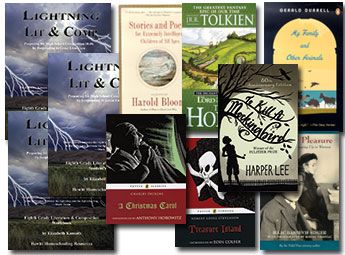
Hewitt Homeshooling produces the Lightning Lit & Comp sets for grades 1 through 8.  The sets include a Student Guide, Workbook and a Teacher's Guide.  With each year's set, there are designated books that will be read and you can buy those from Hewitt Homeschooling or purchase them elsewhere.  The Grade 8 Lightning Lit Set that we reviewed includes the Student Guide, Workbook, Teacher's Guide and 7 literary works: Treasure Island, A Day of Pleasure, A Christmas Carol, The Hobbit, My Family and Other Animals, To Kill a Mockingbird, and Stories and Poems for Extremely Intelligent Children of All Ages.
 Lightning Literature and Composition Pack
Grade 8 with Stories and Poems

Nicholas has been working on Lightning Lit about 3 times a week. So far he has gone through "A Crazy Tale" by G.K. Chesterton from Stories and Poems for Extremely Intelligent Children of All Ages and Treasure Island by Robert Louis Stevenson.  He has enjoyed the readings and the Lightning Lit guides have helped to add enrichment to his comprehension and helped me to sneak in literary lessons into our book discussions.


The Grade 8 Student Guide is broken up into chapters based on each assigned book or reading.  Each chapter in the Student Guide begins with a background of the author and notes about what to look for during reading.  There is a list of vocabulary words from the reading that the student might not be familiar with.  Nicholas always read over this list before doing his reading assignment.  Next there are comprehension questions.  These can be used in different ways but we used these as discussion starting points during our review at the end of each week.  The Student Guide then presents a great Literary Lesson that pertains to the book and these include topics like setting, vivid imagery in poetry, character development, conflict, symbolism, and more.  Then there are Mini-Lessons which may or may not be related to the assigned readings.  Some Mini-Lesson topics include Taking Notes, Citing Sources in a Paper, Sentence Structure, Writing a Conclusion, and more.  Finally, the Student Guide chapters each end in Writing Exercises for the student.  These are intended to be completed after the reading assignment and after completing the Workbook exercises.  Nicholas completed 1-2 writing exercises for each assigned reading.

The Grade 8 Workbook is consumable so your student will be writing in this.  It contains a group of exercises for each assigned book or reading that corresponds with the Literary Lessons in the Student Guide.  For example, for Treasure Island, the Literary Lesson was on Setting.  The Workbook exercises are mostly geared towards analyzing setting.  There are even some fun activities to practice describing setting as the student uses all five senses to describe the setting in different rooms of their own house.  The Workbook also includes some fun activities based on the assigned reading like crossword puzzles and word searches.

The Grade 8 Teacher's Guide begins with an easy-to-understand overview of the program and weekly lesson plans.  Then for each reading assignment, it provides answers to the comprehension questions given in the Student Guide.  I usually try to read the same books that Nicholas is reading or we may even read them together as a read aloud.  But sometimes, I have too many other things going on and I don't get to it.  It is great to have these answers to the comprehension questions laid out for me to help with our discussions.  The Teacher's Guide also provides more information on the lessons, as well as answers for the workbook pages.

If you are interested in reading reviews on Lightning Lit & Comp for other grades, please just click on the link below to see what other Homeschool Review Members have to say:

Hewitt Homeschooling {Reviews}

Crew Disclaimer

Homeschool Planet Online Planner {Review}

I have been a member of the Homeschool Buyers Co-op since I first began homeschooling many years ago.  It is free to join the co-op and it gives you group pricing for homeschool curriculum and resources such as Veritas Press, Alpha Omega, Institute for Excellence in Writing, Saxon Math, Mystery of History, and so much more!  


Homeschool Buyers Co-op

Like any teacher, I spend my summer planning out the next year for our homeschool.  While we love the flexibility of homeschooling, it does add some challenges to detailed planning because we can change our plans spontaneously to go on a museum field trip with friends or take the day to study nature on the trails or have the dreaded sick day.  One summer I had every single lesson plan written out for the entire year.  I included which pages we would work for each day...for every subject, for the entire school year.  It took forever to do but I was proud of my masterpiece of a lesson planner.  Well, needless to say, a sick day here, a field trip there, and next thing you know none of my scheduled lessons matched up with the days on the calendar.  My beautiful lesson planner could just be thrown out the window.  Then I found THE BEST HOMESCHOOL PLANNER EVER on Homeschool Planet.

Homechool Planet

I signed up for the free 30 day trial and used that time to just play around with the program.  It is pretty self-explanatory but they also offer a set of tutorial videos to help you get started.  

There are so many great features to this online homeschool planner!  I can set up an entire year of lessons for each child and then if we decide to have a field trip or there is a sick day, I can just go into the Rescheduling Helper and it will bump all of my lessons forward for as many days as I need.  I just did this for next week when we are planning a trip to the Perot Museum of Nature and Science with some friends.  


I don't have to re-enter anything.  It is all just automatically adjusted for me.  I have our schedule in time slots but we are flexible with that because some lessons get done more quickly or take longer than expected.  Having the times designated helps us stay on track.  However, you can schedule your lessons for the day without using time slots too!  If a child gets ahead or behind in a subject, I can easily adjust the lessons with a click of a button.  It's wonderful! 

I can set up schedules for each child separately and I even have my own personal schedule too.  We do a lot of read alouds where my son, daughter, and I take turns reading aloud books that all of us can enjoy like the Bible and some of our science and history books.  I don't have to go into each of their schedules to enter that separately.  When I am entering lesson plan information, Homeschool Planet lets me designate whether it goes on Rachel's schedule, Nicholas' schedule, my schedule, or any combination of the three.  It automatically puts that lesson information where I need it to go.  That's a big time saver for homeschool families that do school work together with multiple children.

You can view your lessons plans online from multiple devices.  You can also have your lesson plans sent to your Google calendar or sent to your child's email address so they can see their schedule from their tablet.  If you like pen and paper then you can use Homeschool Planet to organize your lessons and then just print them out.  There are different formats available.  Here is a way I print it out for my kids each day so they can see what they have to do and check it off once they have completed it. 


Some other great features about Homeschool Planet is that you can attach weblinks to the lesson plans so all of the needed resources for the lesson are listed in one place.  It also allows you to enter grades for all assignments or you can enter simply pass/fail.  Homeschool Planet makes tracking easier by keeping up with hours spent on each class and can even create a transcript. Some other helpful features is the To Do Lists, Reading Lists, even receive daily scriptures to inspire you.  

A huge time saver that I love is that the Homeschool Buyers Co-op offers a Homeschool Planet Lesson Marketplace where you can purchase daily lesson plans for specific homeschool curriculums that will automatically fill in your child's schedule on Homeschool Planet for you!   These lesson plans are from well-known homeschool curriclum providers like LifePac, Rosetta Stone, BJU Press, Wordly Wise, All About Spelling, Saxon and Horizon Math, Teaching Textbooks, and even The Magic School Bus books!  And right now, if you sign up for the free trial of Homeschool Planet you will also receive ONE FREE LESSON PLAN!  But the Free Lesson plan offer is only good through 6/30/17 so hurry!


Check out Homeschool Buyers Co-op for more than just Homeschool Planet.  They also have other great curriculum as well as many freebies like a Homeschool ID card and lots of free trials especially during the summer.  You also earn SmartPoints on purchases made through the co-op which you can then use towards future co-op purchases.  For more information about the Homeschool Buyer's Co-op, please check out these online resources:

Facebook: https://www.facebook.com/homeschoolbuyers
Twitter: https://twitter.com/hsbuyerscoop/
Pinterest: https://au.pinterest.com/homeschoolbuyer/
Instagram: https://www.instagram.com/homeschoolbuyers/
Google+: https://plus.google.com/112069021534542740249

If you would to read some additional reviews about Homeschool Planet written by other members of the Homeschool Review Crew, please click the banner below.

Homeschool Planet {Homeschool Buyers Co-op Reviews}

Crew Disclaimer